Road Sections
Roads are nothing more than a sequence of modular sections placed one after another.
This simple fact allows to create a large variety of roads using just a few different
simulation.utils.road.sections.
While Roads provides a general introductions to roads, this page aims to highlight the different available road sections. Required and optional arguments are not explained in detail for every road section. However, all arguments can always be found by checking out the implementation of each section. (Simply click on the link!)
Please note that all angles must be specified in radians!
StraightRoad
The simulation.utils.road.sections.straight_road.StraightRoad is a straight road.
This is an example on how to create a StraightRoad with length of two meters:
1 | straight_road = StraightRoad(length=2) |
ParkingArea
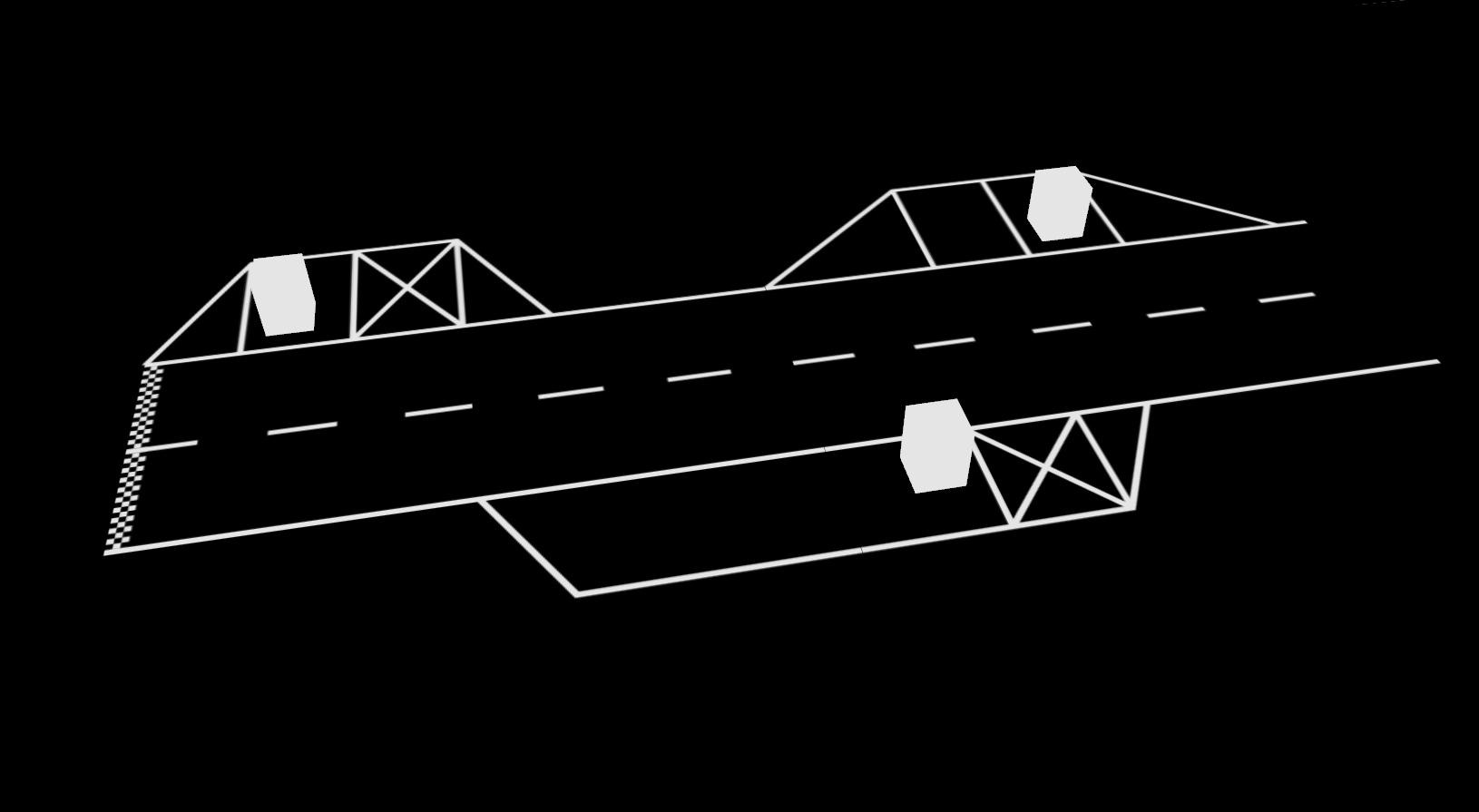
The simulation.utils.road.sections.parking_area.ParkingArea is a straight road
with parking lots on the left and right side.
The arguments left_lots and right_lots each define a list of
simulation.utils.road.sections.parking_area.ParkingLot.
Each parking lot can contain multiple simulation.utils.road.sections.parking_area.ParkingSpots.
This is an example on how to create a ParkingArea:
1 2 3 4 5 6 7 8 9 10 11 12 13 14 15 16 17 18 19 20 21 22 23 24 25 26 27 28 29 30 31 32 33 | parking_area = ParkingArea( length=4, start_line=True, left_lots=[ ParkingLot( spots=[ ParkingSpot(kind=ParkingSpot.OCCUPIED, obstacle=ParkingObstacle()), ParkingSpot(kind=ParkingSpot.BLOCKED), ], ), ParkingLot( start=2, opening_angle=math.radians(40), spots=[ ParkingSpot(), ParkingSpot(kind=ParkingSpot.OCCUPIED, obstacle=ParkingObstacle()), ], ), ], right_lots=[ ParkingLot( start=1, depth=0.4, spots=[ ParkingSpot(kind=ParkingSpot.FREE, width=0.5), ParkingSpot( kind=ParkingSpot.OCCUPIED, width=0.7, obstacle=ParkingObstacle() ), ParkingSpot(kind=ParkingSpot.BLOCKED), ], ) ], ) |
The ParkingArea takes three optional arguments, which are start_line, left_lots, and right_lots.
In the example, start_line is set to StartLine(). This creates a StartLine at the beginning of the ParkingArea.
If you do not want a StartLine, remove start_line=StartLine(). By default, start_line is None.
You can also discover this if you take a closer look at simulation.utils.road.sections.parking_area.
If you want to take this one step further, it is also possible to create a ParkingArea without any children; practically a StraightRoad.
The arguments left_lots and right_lots expect a list of ParkingLots. In this example two lots are created on the left and one is on the right side.
In the first lot on the left side, two ParkingSpots are placed. As you already know, ParkingSpots can have three different types.
The first spot in this example is occupied by a ParkingObstacle, the second is blocked, i.e. it looks like an X.
The second lot on the left looks different. You can also specify a length and an opening_angle for a ParkingLot.
Here, the start is set to two meters from the beginning of the ParkingArea. If you do not specify the start argument (like in the first lot) it is set to zero.
The opening angle is set to 40 degrees; the default is 60 degrees.
For the first spot in this lot, no arguments are given and thus it’s kind is ParkingSpot.FREE and there’s no obstacle placed inside.
This is the default behavior for a ParkingSpot.
Caution
Be careful: it is possible to place an obstacle on a free spot. The rendered road will look perfectly fine but it can cause problems in automatic driving tests because on a free spot no obstacle is expected.
Moving to the single lot on the right side, you can see the third optional argument for a ParkingLot.
It is called depth and controls the depth (along the y-axis) of a lot.
There is no length parameter because the length (along the x-axis) is calculated as the sum of all spots in one lot.
To change the size of a spot along the x-axis, simply specify a width parameter.
You can not set the depth of a spot because it is derived from the parent lot.
Intersection
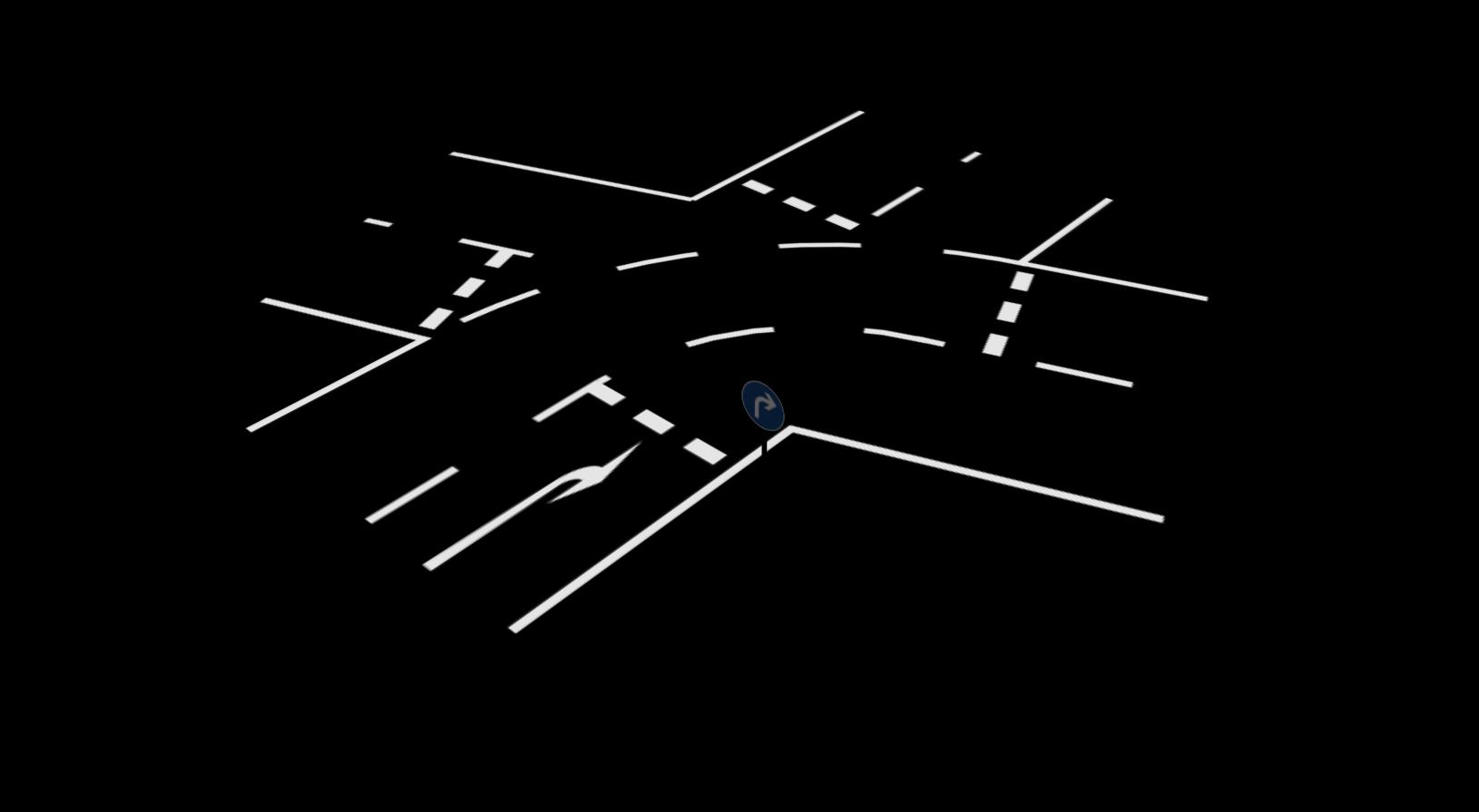
1 | intersection = Intersection(size=2, turn=Intersection.RIGHT, angle=math.radians(110)) |
Use simulation.utils.road.sections.intersection.Intersection to create a Intersection.
In this example, the crossing roads intersect at a 110-degree angle.
The simulation.utils.road.sections.intersection.Intersection.turn parameter indicates in which direction the road continues
after the intersection.
The possible turn values are simulation.utils.road.sections.intersection.Intersection.RIGHT, simulation.utils.road.sections.intersection.Intersection.LEFT and simulation.utils.road.sections.intersection.Intersection.STRAIGHT,
the latter is the default.
The default size is 1.8 m and represents the length of each of the crossing roads.
Using the simulation.utils.road.sections.intersection.Intersection.rule parameter it is possible to generate intersections with different priority rules.
The possible turn values are:
simulation.utils.road.sections.intersection.Intersection.EQUALsimulation.utils.road.sections.intersection.Intersection.YIELDsimulation.utils.road.sections.intersection.Intersection.STOPsimulation.utils.road.sections.intersection.Intersection.PRIORITY_YIELDsimulation.utils.road.sections.intersection.Intersection.PRIORITY_STOP
The first is the default.
T-Intersection
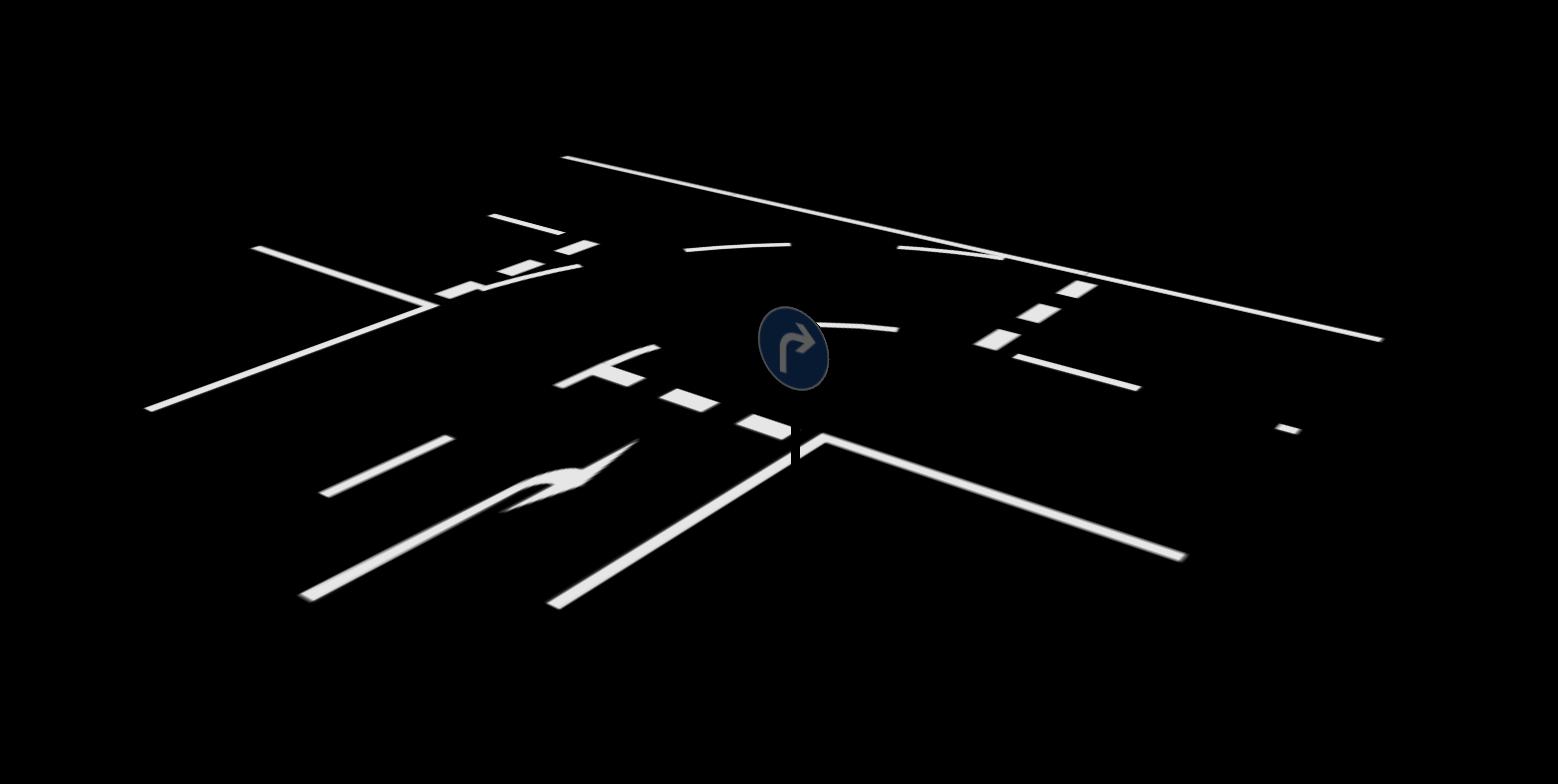
1 | t_intersection = Intersection(turn=Intersection.RIGHT, closing=Intersection.STRAIGHT) |
This generates a three-way intersection. One arm of the intersection has to be removed. The simulation.utils.road.sections.intersection.Intersection.closing parameter accepts the same options as the simulation.utils.road.sections.intersection.Intersection.turn parameter and the given direction is closed of.
Closed Loop at Intersection
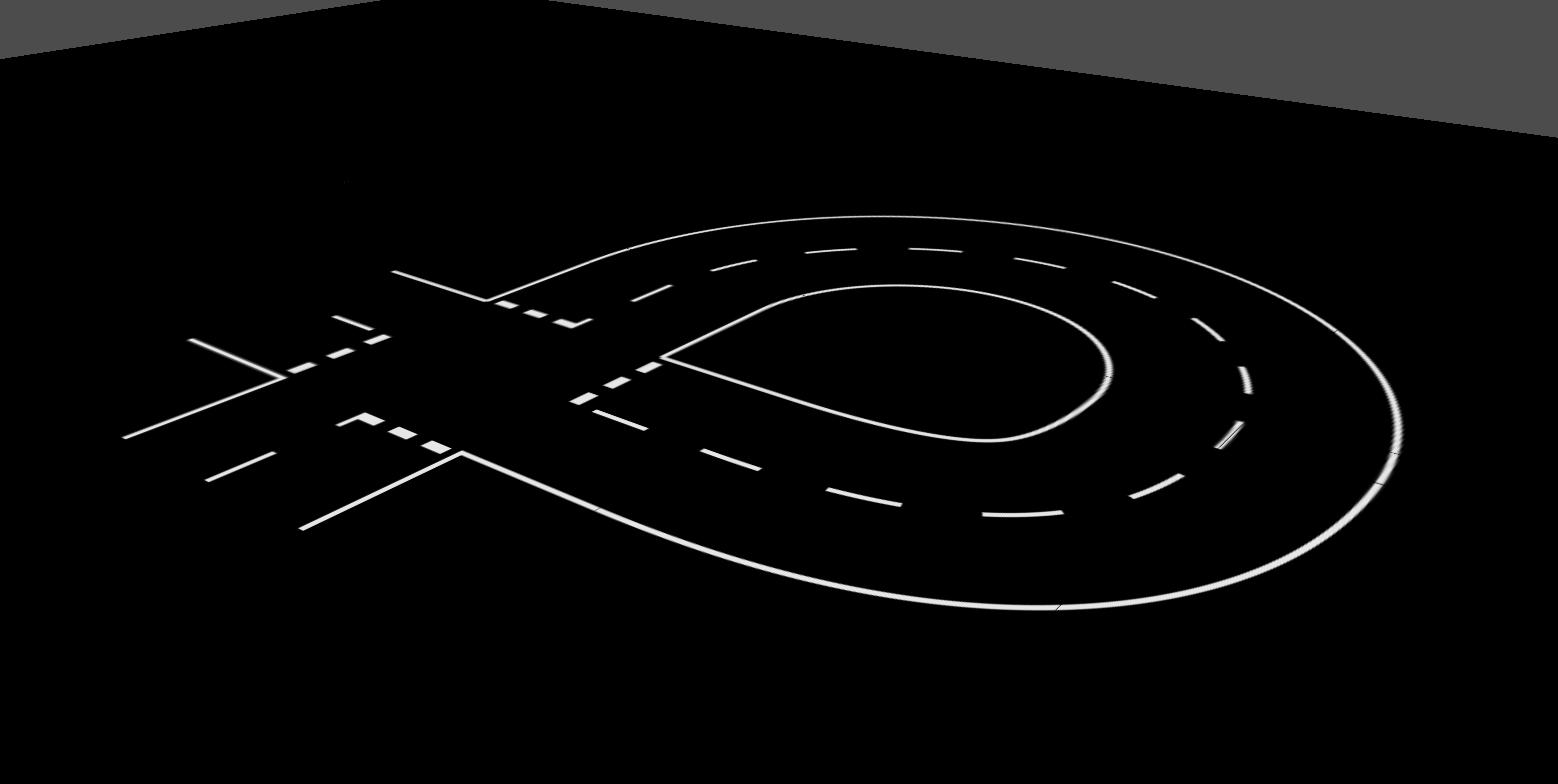
1 2 3 4 | loop_intersection = Intersection() road.append(loop_intersection) road.append(RightCircularArc(angle=math.pi, radius=1)) road.close_intersection(loop_intersection, Intersection.RIGHT, Intersection.STRAIGHT) |
To generate a closed loop at an Intersection and thus driving two times across it simulation.utils.road.road.Road.close_to_section() has to be used. After crossing the intersection in a straight direction, a RightCircularArc is added. The end of this arc is then automatically connected to the right arm of the initial intersection. When crossing the intersection a second time, the direction is set to straight.
ZebraCrossing

The zebra crossing spans the entire length of this section. If no length argument is given, it defaults to 0.45 m.
1 | zebra_crossing = ZebraCrossing(length=0.5) |
Pedestrian
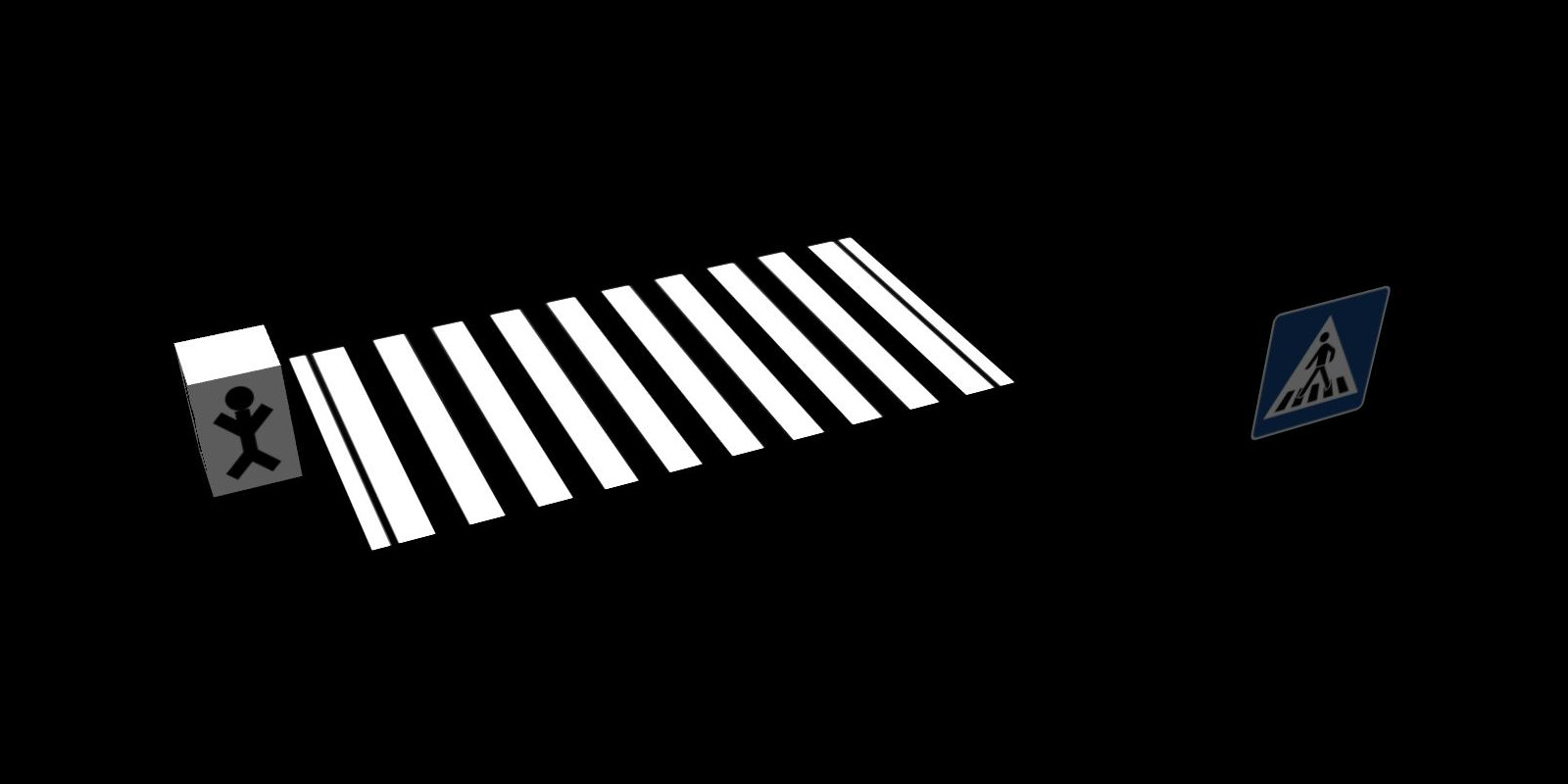
A simulation.utils.road.sections.obstacle.pedestrian is added in the same way as any other obstacle. The arc_length attribute specifies where along the road the pedestrian is placed.
1 | zebra_crossing = ZebraCrossing(obstacles=[Pedestrian()]) |
CircularArc
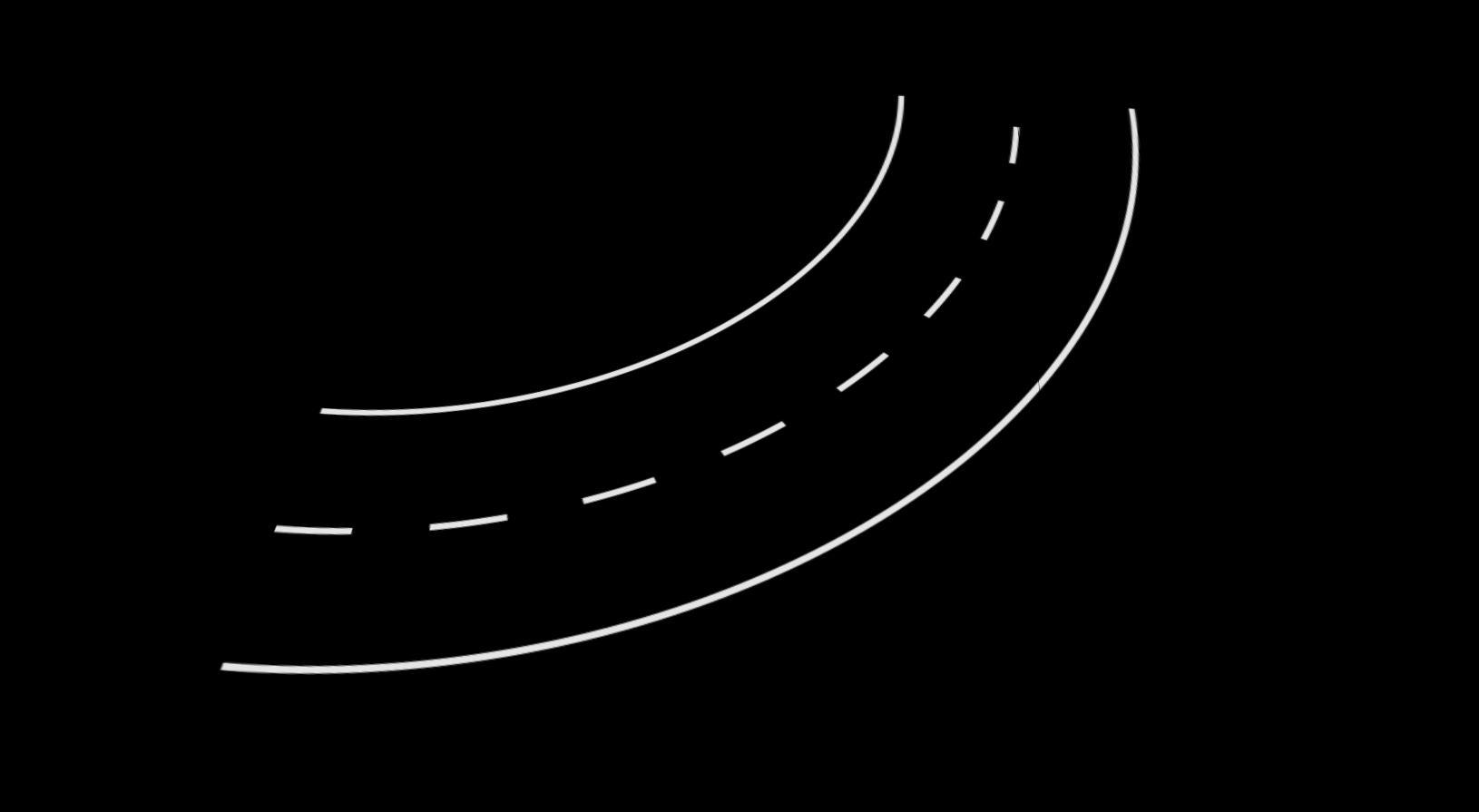
This section creates a circular arc pointing to the left (LeftCircularArc) and right (RightCircularArc).
This means instead of creating an arc with a negative radius to make it turn right the radius is always positive.
The two required parametes for an arc are radius and angle.
1 | left_arc = LeftCircularArc(radius=2, angle=math.radians(90)) |
This example creates a circular arc to the left resulting in a 90-degree turn.
BlockedArea
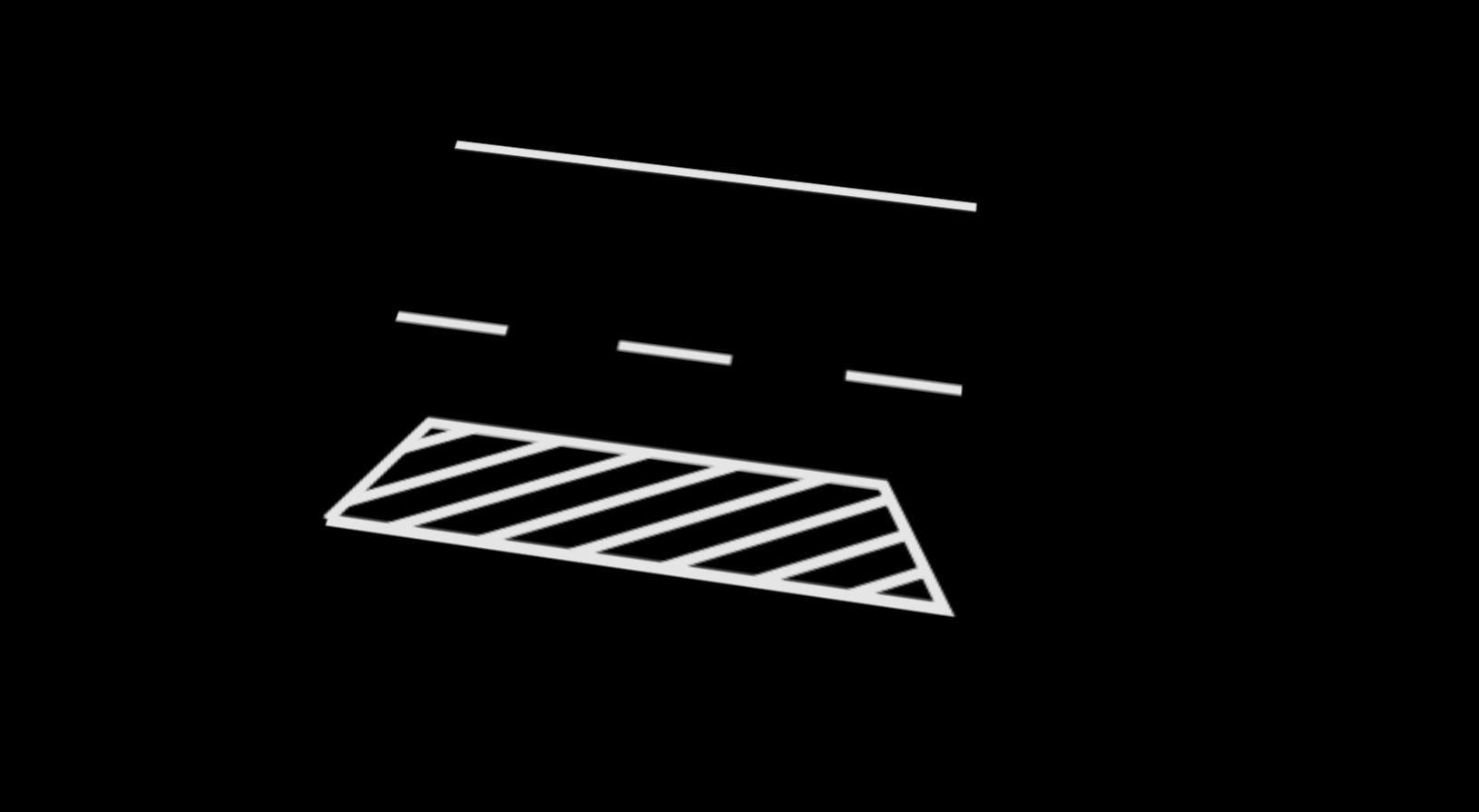
The simulation.utils.road.sections.blocked_area.BlockedArea is a straight road,
but the car is not allowed to drive on the blocked area which is marked by parallel white lines.
By default the section is 1 m in length and the blocked area is 0.2 m wide, starting on the right line.
This is an example on how to create a BlockedArea with a length of 1 m and a blocked area which is 0.2 m in width:
1 | blocked_area = BlockedArea(length=1, width=0.2) |
TrafficIsland
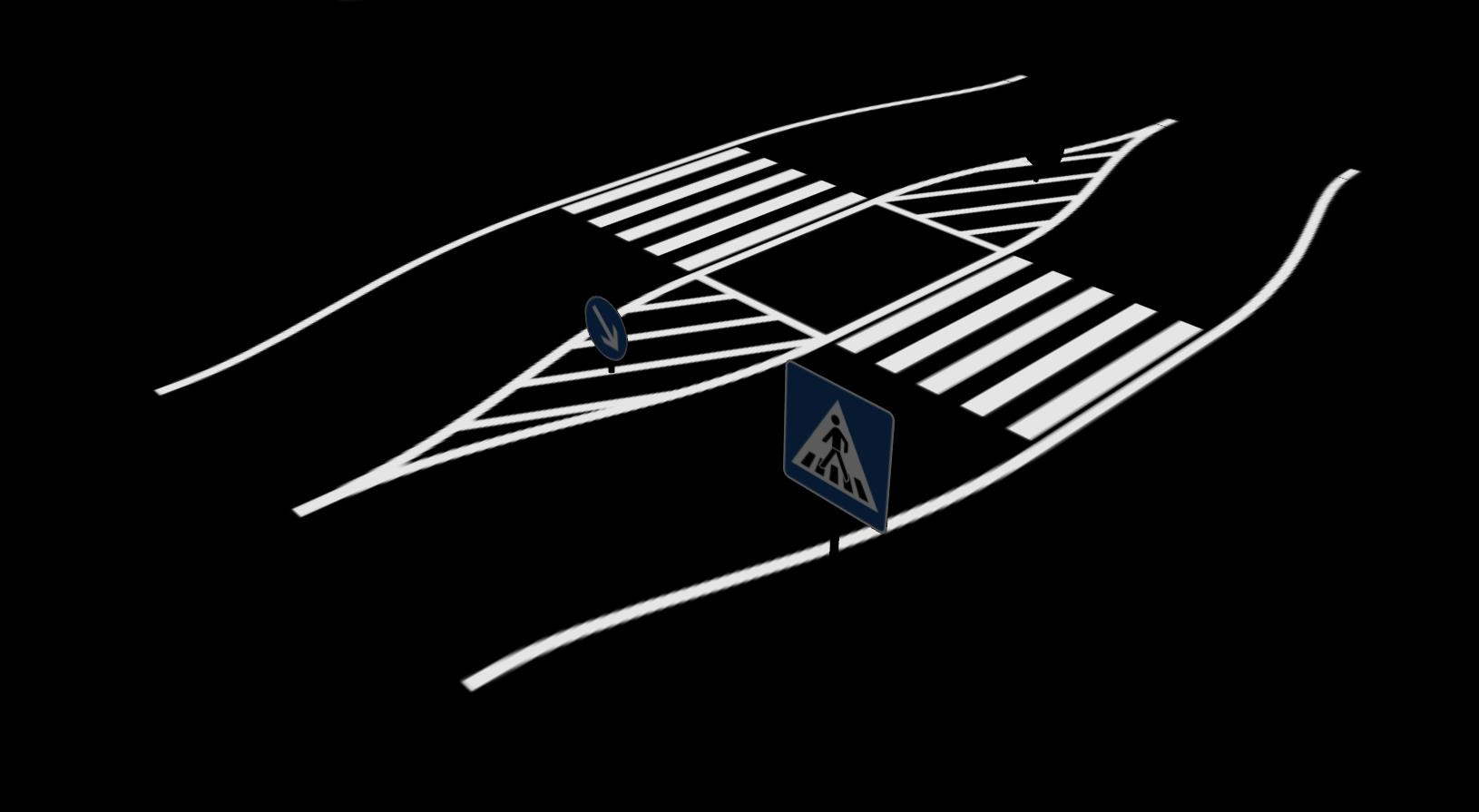
The simulation.utils.road.sections.traffic_island.TrafficIsland consists of
a visible traffic island in the center of the road and a crosswalk or just dashed lines
connecting the island with both sides of the road. B
Pedestrians are coming soon!
The parameters in the following example are also the default parameters:
1 2 3 4 5 6 7 | traffic_island = TrafficIsland( island_width=0.3, zebra_length=0.45, curve_area_length=0.8, curvature=0.4, zebra_marking_type=TrafficIsland.ZEBRA, ) |
StaticObstacle
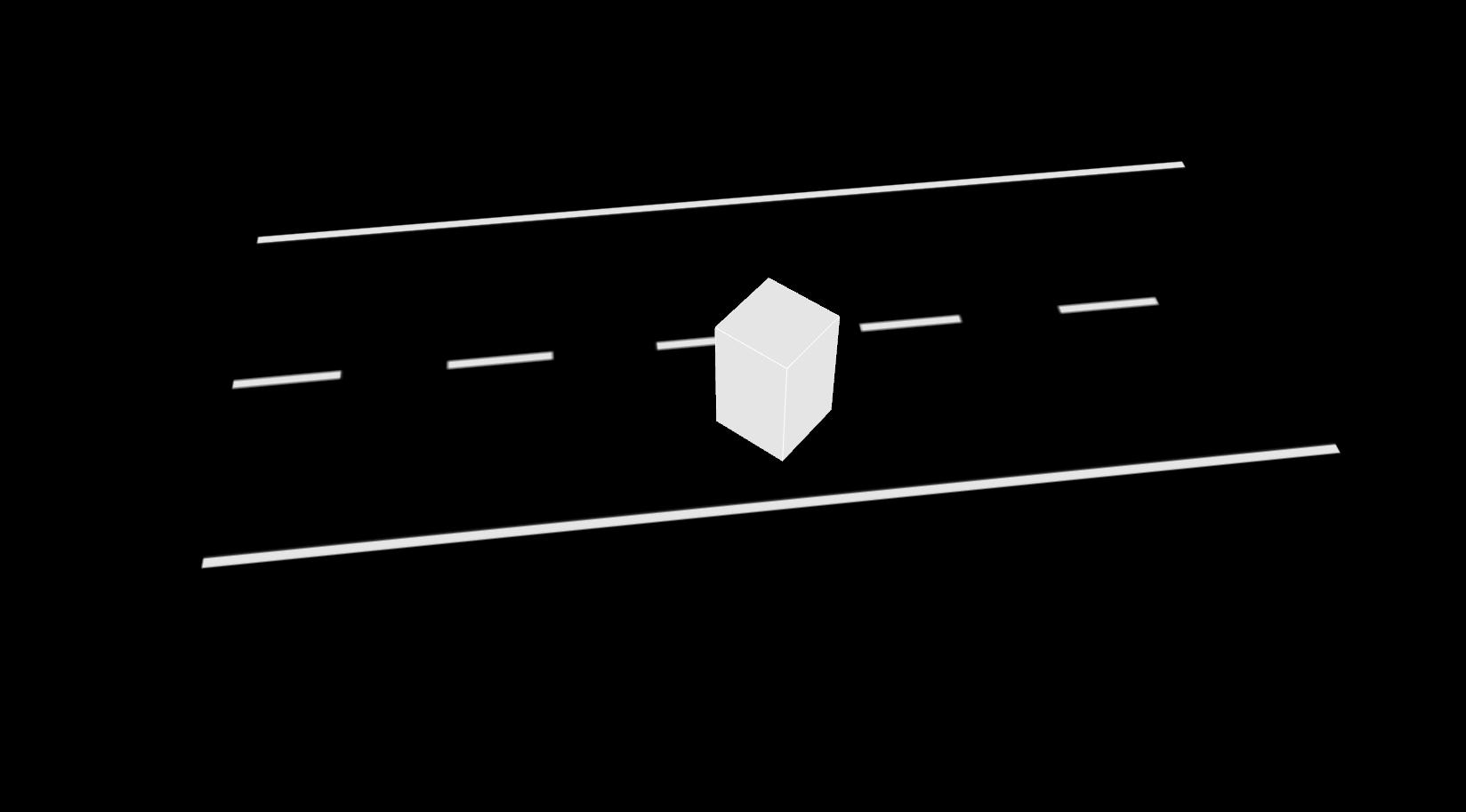
Static Obstacles can be placed on any road section.
In this example a simulation.utils.road.sections.obstacle.StaticObstacle is placed
on a StraightRoad using the simulation.utils.road.sections.road_section.RoadSection.add_obstacle() method.
The generated obstacle is aligned along the middle line of the current section.
In this case the obstacle is placed after one meter (arc_length) from the beginning of the current sections middle line
and with a negative y_offset, thus ending up in the middle of the StraightRoad on the right lane.
The width and height of the obstacle are defined by parameters of the same name.
For rotating the obstacle an angle can be specified. The example shows an obstacle rotated by 45 degrees.
1 2 3 4 | straight_road_obs = StraightRoad(length=2) straight_road_obs.add_obstacle( arc_length=1, y_offset=-0.2, width=0.15, length=0.15, angle=math.radians(45) ) |
It is also possible to place obstacles during creation of a RoadSection object. A list of obstacles can be passed to any road section.
1 2 3 | straight_road_obs_ = StraightRoad( length=2, obstacles=[StaticObstacle(width=0.15, depth=0.15)] ) |
DynamicObstacle
Dynamic Obstacles can be placed on any road section.
In the following example a simulation.utils.road.sections.obstacle.DynamicObstacle is placed on the opposite side of the road.
The obstacle is moved from the end of the road to the start.
Caution
Be careful: On the opposite side of the road the path points have to be specified in reverse order!
1 2 3 4 | path = [Point(0, 0.2), Point(2, 0.2)] straight_road_dyn_obs = StraightRoad( length=2, obstacles=[DynamicObstacle(path_points=path, speed=0.5)] ) |